
How to Search Cases by Name
The re:SearchTX court-record search, linked by the Polk County District Clerk, is the first electronic route for covered district and county cases. It requires an account. A broad name can return cases from several courts, so begin with the full legal name, then use filters to narrow the result. Compare the case caption, court, case type, filing date, and cause number before opening a record. A shared name alone does not identify a party.
- Open re:SearchTX from the Polk County District Clerk page and register or sign in.
- Choose Cases and enter the name. Try surname-first order, initials, and text without punctuation when the first search fails.
- Apply court, case-type, or date filters. Polk District Court, County Court at Law, JP, and municipal matters may follow different routes.
- Open the case description and compare all key fields. Save the cause number and court before seeking a filing or hearing.
- Contact the proper clerk if no reliable match appears or if a needed image is unavailable.
The portal separates case, filing, text, and hearing searches. A case-caption query is not the same as a filing-text query, and a hearing hit may contain less detail than the full court docket. Use only the data needed to distinguish records. Do not copy protected addresses or identity numbers into notes that others can see.
| Field Label | Type | Required | Notes |
|---|---|---|---|
| Keyword | Text | Yes | Name, caption, or other search term; refine after results load. |
| Cases | Search card | No | Opens case-level matches and Case Details. |
| Filings or Text | Search card | No | Finds filing metadata or searchable document text where available. |
| Hearings | Search card | No | Returns available setting metadata, not a final ruling. |
Polk County Search Portal Layers
Four re:SearchTX cards divide a Polk County case lookup into distinct tasks. Cases finds the file-level record. Filings locates accepted documents. Text searches indexed content where access permits, while Hearings displays available setting data. Login, role, coverage, and image fees can affect what appears. Export and saved-search controls may help an account holder organize results, but they do not preserve a court date or create an official filing.
The re:SearchTX home page describes the statewide product. The official interface shown below is useful for recognizing the search layer before entering case terms.
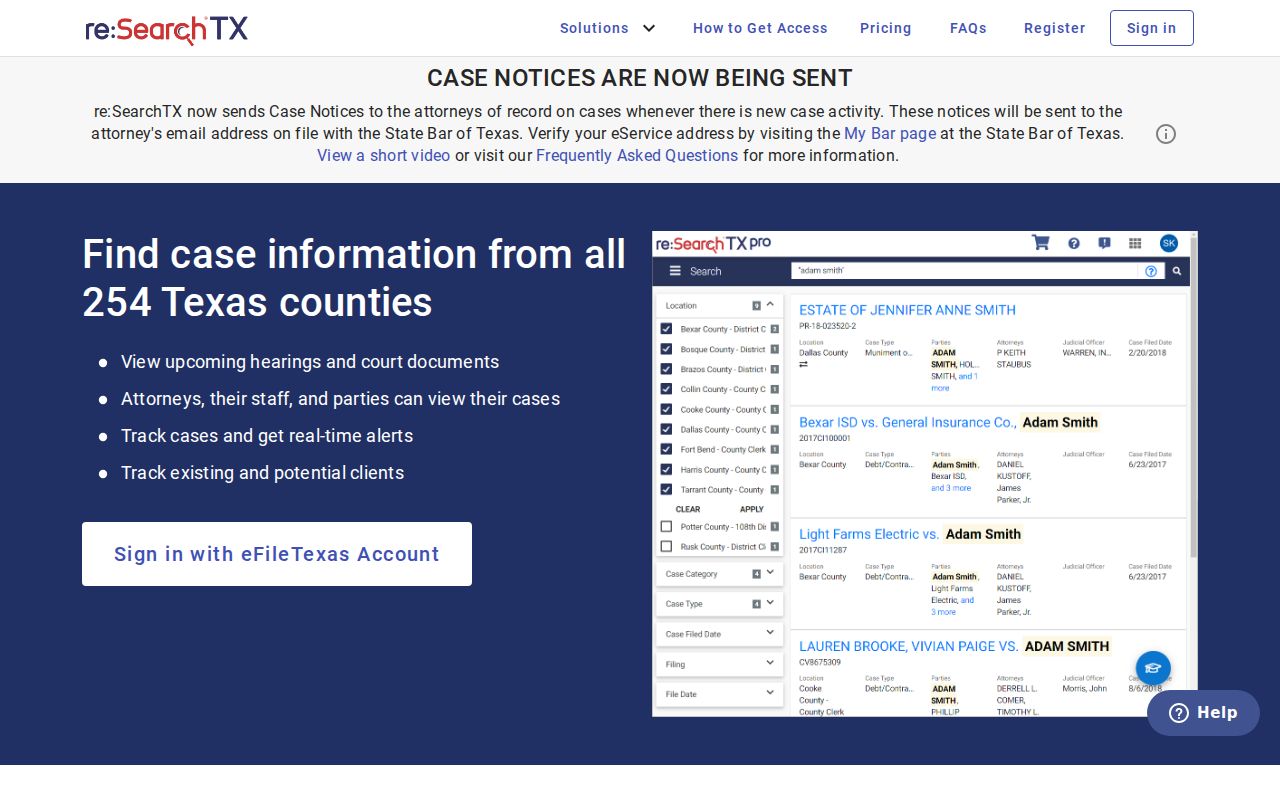
The card layout also explains why one query may find a case but not its filing image. Search each relevant card, then take unresolved document questions to the custodian.
How to Search by Case Number
A cause number is the strongest search key because it points to a particular court file. Polk research did not establish one universal number pattern across all courts, so enter the value exactly as printed on the notice, citation, pleading, or order. A Polk identifier such as cause number as filed may include letters, punctuation, a year, or a court-specific sequence. Do not strip those parts unless the portal rejects them.
If re:SearchTX does not accept the full form, test a punctuation-free version and confirm the court. Give the same exact number to the District Clerk for district cases, the County Clerk for county-level records, or the named JP or municipal clerk for local matters. The court name is essential because separate courts can use different numbering systems.
Polk County Clerk Search Fallback
When the statewide layer stops, Polk County has two separate clerk paths. District Clerk Monica Goodson keeps district criminal, civil, family, and historical records at 101 W Mill Street, Suite 216, Livingston, with phone 936-327-6814. County Clerk Schelana Hock keeps County Court and County Court at Law civil, criminal, probate, and guardianship materials at Suite 265, with phone 936-327-6805. Both offices list weekday hours from 8 a.m. to 5 p.m.
The County Clerk page offers a free index route plus civil, criminal, and probate request forms. A request works best with the cause number, full party or estate name, court, approximate year, and exact document. Mail, phone, card, and counter options may apply to copies. For a current setting, contact the clerk or court coordinator rather than treating a copy form as a live calendar.
What a Case Search Shows
A Polk County result can show the register of events without showing the whole file. Read entries in date order. “Filed” means the clerk accepted an item; “set” points to a scheduled event; “granted,” “denied,” “dismissed,” and “final” carry different effects. A motion entry does not prove the judge ruled on it. Likewise, a payment balance is not a judgment.
| Case identifier | The court's cause number and best key for later requests. |
|---|---|
| Style or parties | The caption, often plaintiff and defendant or petitioner and respondent. |
| Court and case type | The custodian and category, such as district civil, family, probate, or Class C. |
| Filed and event dates | Acceptance dates and dates tied to later actions or hearings. |
| Last event or status | The latest indexed step, which may not state the complete outcome. |
| Image access | Whether a filing can be viewed, bought, or must be requested from the clerk. |
Missing Polk County Case Results
No result does not mean no case. The spelling may differ, the filing may still await acceptance or indexing, the matter may sit with a JP or municipal court, or public access may be limited. First test name order and punctuation. Next search by cause number. Then verify the court on the source notice or citation.
Older records need another path. The historical District Clerk index searches certain books by type, year, party name, or book, volume, and page. It includes district minutes beginning in 1846 and a docket book covering 1848 through 1871. An index hit is a lead, not proof that the full document is online. Ask the District Clerk about an unscanned book or case paper.
Municipal and JP cases can stay local. Read the issuing court on a citation, then call that court. A Polk address does not by itself tell which court filed a case.
County vs Statewide Case Search
Texas does not offer one public index for every trial court. re:SearchTX is a broad electronic layer for participating data, while Polk's clerks and local courts remain the authoritative source for their own files. The County Clerk's forms locate or order county-held records. The District Clerk answers district custody questions. JP and city clerks handle their separate dockets.
| re:SearchTX | Polk County and local routes |
|---|---|
| Covered electronic cases, filings, text, and hearings | District Clerk, County Clerk, four JP courts, and city courts |
| Account and role can affect document access | Clerks can address copies, certification, and local gaps |
| Best for an initial name or cause-number search | Best for a known court, missing image, old record, or certified copy |
Polk County Cost Portal Limits
The county's Make a Payment page links to a court-cost and fine account search. It accepts several identifiers, including cause number, name with date of birth, business name, and other sensitive search combinations. That tool can help follow a cost or fine when the cause number is unknown.
It is not a complete case lookup. A balance does not reveal every filing, hearing, order, or disposition. Record the court and cause number from any useful result, then obtain the court docket or signed judgment from its clerk. Never publish a driver license number, Social Security number, date of birth, or plate used in the private search transaction.
Restricted Cases and Access Rules
Public access has lawful limits. Juvenile information protected by Texas Family Code Chapter 58, expunged records governed by Code of Criminal Procedure Chapter 55A, sealed filings, and protected-order data may be hidden or redacted. A case may show only metadata, an access warning, or nothing in one portal.
Texas Judicial Branch Rule 12 guidance explains that judicial access is not the same as an ordinary agency request under the Texas Public Information Act. Ask the custodian which process applies. A party role or court order may permit access that a public account lacks, but no one should try to bypass a restriction.
Confirm any key fact with the filed document or clerk. A name match, calendar line, or cost result cannot establish identity or the full outcome.
Polk County E-Filing Lag
An eFileTexas receipt does not mean a new Polk County case is already public. The clerk must accept the submission, the case-management system must match or create the parties, and the record must reach the public access layer. Polk's instructions stress full party names and addresses because Odyssey-style matching is name based.
When a new filing is missing, check its acceptance notice first. Then search by cause number and contact the correct clerk. Do not file the same document again merely because re:SearchTX has not indexed it.